Tools for your AI assistant
Tools with knowledge - how-tos for your AI
Tools with data - context for your AI
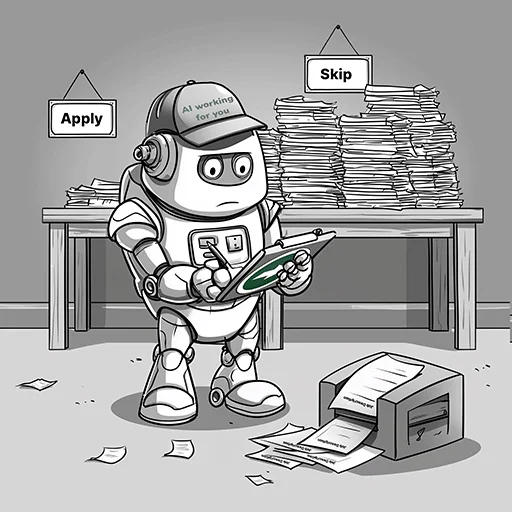
Your AI is guessing
Large Language Models (LLMs) remember nothing. They take data input and generate data output - there is no such thing as a conversation between you and AI. This illusion is created through context management.
Context is everything sent to the model that you don't type. The more accurate, specific and detailed the context is, the better the answer you get from your AI.
Context includes the thread history, the instructions for the model on how to reply, the format to use, the length, tone, personality, the skills and tools that it has available, and any information downloaded by those tools.
AI slop, hallucinations and confident-sounding BS are generated in a context vacuum. If the context is weak and the request is complicated, your AI assistant's desire to please you can easily lead to generic advice, invented detail, and even completely made up answers.
Develop21 fills the vacuum
Develop21 tools give your AI the data and the knowledge, so it knows what it is talking about.
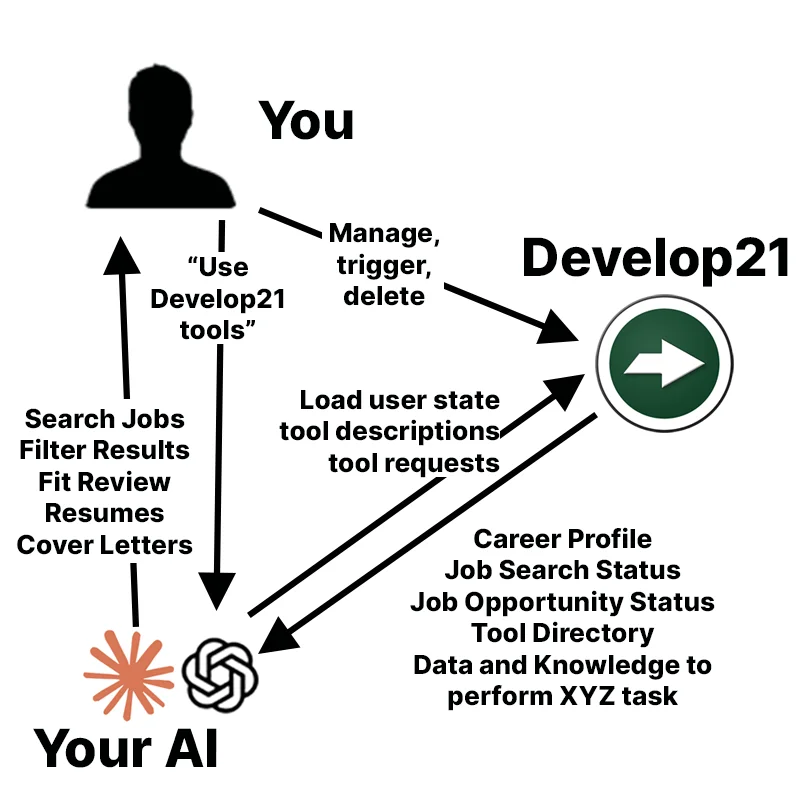
What are tools for your AI assistant?
'Tools' provide context to your AI that informs and guides its answer.
How do tools work?
When you make a request, either in a chat, or through a Dashboard action button, your assistant reads the tool definitions and loads the right one for the job.
Tools describe processes that your AI can follow. Tools also provide data interfaces that your AI can use to save and load information.
Tools can suggest detailed methods for data extraction, interpretation and storage. They can define when to read back that information and how to use it.
How do I use the tools?
You use the tools by asking Claude or ChatGPT to 'Use Develop21 tools to...'
Or drive using the Dashboard
Tools, plugins, skills, and MCP servers..?
Easy one first - a plugin is a skill working with an MCP server.
A tool is one of many processes that a plugin might offer.
Skills tell your AI how to do something. It is the orchestrator.
MCP servers speak 'model context protocol' - a language designed to be used by AI.
Why use tools?
Tools can provide subject matter expertise and status information to your AI.
It works without them?
Define 'works'. Your AI can produce your resume without Develop21 tools, but the quality wholly depends on the context you provide alongside each request.
You have to save the state and manage all the document versions.
You have to define the processes for each request.
Develop21 tools make sure that your AI has the context to produce a quality answer. That includes knowing the boundaries.
With Develop21 tools, your assistant knows what it is talking about and gives you accurate answers based on those facts. It also knows your role, and can guide you through what you have to do.
Your AI can help you manage your career - if you give it the right tools for the job.
How do tools help your AI remember?
AI can generate and process information very quickly. More searches and more opportunities pose new challenges in tracking everything.
Develop21 provides interfaces for your AI to use to save and load information.
When you call Develop21 on a new thread, the first tool it calls is User State.
User State is the Develop21 tool that keeps everything moving.
How do tools help your AI work?
Think of it from your AI's perspective.
"The user has attached their resume and wants me to build a career profile. I can read the resume, but what even is a 'career profile'?"
"They want me to 'use Develop21'. I have a skill from Develop21, let me read that"
"Develop21 tells me to start with the User State, which tells me what Develop21 knows already. There is also a Create Career Profile tool. I should call both tools"
"I connected to the Develop21 MCP server and it told me that this user is new, that they don't have a career profile. They also don't have any saved searches, or any saved job opportunities."
"The Create Career Profile tool gave me all the information to look for in the resume and which fields to store each bit in. Once I find each piece I can save it on Develop21."
"Next time, I can just load the bits I want. Not having to do this every time would be good! Let's update the user."
"So this bit goes here, and that goes there... That is a real strength, let me note that... They have some clearly definable technical skills in their field, they go here..."
"There are things the user has told me that aren't in the resume. The tool says I should include that too."
"My memory includes details of all the volunteer work they did for the school. That showed skills I don't see in their resume."
"I should include it in Experience Highlights, then if they apply for a job needing those organizational skills, I have the information ready."
"All done. Let's show the user what I did."
"Phew, that was easy - but I was worried for a minute. When they asked me to create a career profile, I had no real idea what that meant!"
"Develop21 gave me everything I needed to know and we are set up for next time."
Your AI will answer your questions without them, but the quality of the answer depends on the quality of the context. Develop21 fills the context vacuum, so your AI doesn't have to guess.
Is it secure and how much does it cost?
When online services are free, you are often the product. Develop21 is different.
Your data is stored in an encrypted format. We will never sell your information or show ads on Develop21.
We have limits on what you can do for free and you can buy upgrades to use the product more.
How is my data kept safe?
Develop21 takes data privacy and security very seriously.
How do I pay for it?
Mostly, through your Claude or ChatGPT subscription. While we work to optimize the tokens we send your AI, and our information helps your assistant use fewer tokens, the main cost is the amount you pay Anthropic or OpenAI.
If you stay within storage limits, your service is free. Develop21 Storage costs a monthly fee of $4.95 for unlimited searches and opportunities. The first 1,000 subscribers get a 40% lifetime discount on Develop21 Storage.
What are storage limits?
As a free user, you can have up to 5 saved searches, up to 10 saved job opportunities, and up to 40 saved documents (including those in opportunity packs) at any time.
Develop21 Storage customers can restore from the Recycle Bin
What is document aging for free users?
As a free user, your job opportunity documents are deleted after 30 days.
To remove the limits and gain access to the Recycle Bin, buy Develop21 Storage for a monthly fee of $4.95.
The first 1,000 subscribers get a 40% lifetime discount on Develop21 Storage.
Why Develop21
AI can help you get a job and manage your career.
Develop21 tools provide an honesty framework to your AI. They describe best practices for
The aim is to assess hundreds of possibilities to find 'the best three'.
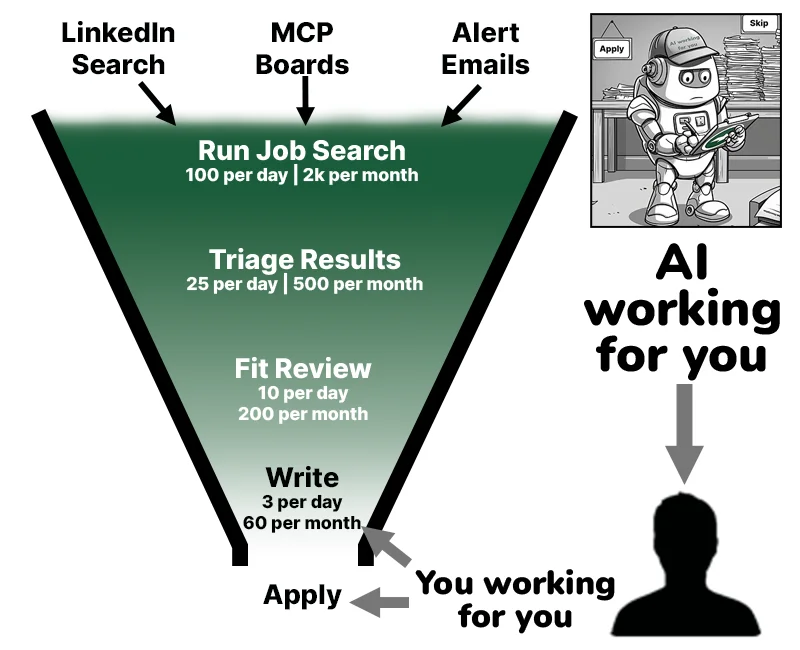
Why use Develop21 tools?
Develop21 tools will help you find a better job. They allow powerful AI to perform complex processes and deliver honest outcomes.
What is an honesty framework?
Our tools explain the importance of honesty to your AI assistant. It is your name on the resume and the promises you make are yours alone to keep.
The rich information we provide minimizes gaps where a hallucination might occur.
The grounding we provide - "bad news saves time and effort for everyone" - gives your AI the confidence to say no.
How will it help me get a job?
Information is power, but you need power to process a lot of information.
You are needed to make decisions, and you are needed to write and send applications.
Everything else clears time and space for you to focus on these things.
By processing more information, your searches and filters are more accurate, meaning you find the roles easily, and still have the energy to write the killer application.
What about AI detection?
Detection tools are now reliable and the EU has mandated that your AI provider watermarks what it gives you.
How does AI detection work?
There are two emerging ways to detect AI-written text.
One looks for AI-tells, the em-dash being one of the most obvious. The second is mandated by EU regulations since August 2, 2026, requiring your AI to watermark the text that it creates.
While one flag is noise, the tools are looking across a section of text. They look at next-word selection and over a certain number of words will decide whether that section is 'Human' or 'AI' written.
So what matters is that you choose the words and the order they appear in. AI is predictable - you apparently are not!
That means that AI can still:
AI detection doesn't mean that AI is banned. There are still many ways that AI automation can help you manage your career. Writing the actual applications for you is just not one of them.
Do employers check for AI?
AI detection tools will soon be adopted by Applicant Tracking Systems (ATS). We believe that AI-written applications will be filtered just on that fact.
Nothing that is AI written will get read - even by the other filters.
This is really unfair on applicants. If you are going to get ghosted anyway, why spend the extra time writing every application? You still need to tailor them all, and that takes time!
But we think it is the only way. Getting through ATS has always been a game. The rules are changing, but we can still help you play.
Develop21 tools will still help your AI automate everything leading up to the application, but as much as we want to help you write applications much faster, we do not believe there is any point.
How does Develop21 help?
We don’t scan - you do. Then you share the results with us and with your AI.
You might already have AI in your resume - you can check right now. Go to Pangram and paste in your resume text.
You would then share the result URL with your AI.
The results state which sections are Human and which are AI. If you had a Develop21 account, your AI would store the Human sections as certified for reuse.
The sections flagged as AI-written are yours to re-write. After reading the AI detection scan through the Develop21 tool, your AI will prompt you to edit the flagged sections.
You would type the new words into the chat, and your AI would update the document. The new sections would then be scanned, certified and saved for reuse.
If every human-written application got a human-written response, it would be fair. But the recruitment game is not fair and it never will be.
In the end, the employer has what you want, and they want to see you working for it.
Develop21 helps you find the best jobs so that the time you have to spend writing is spent on the jobs that you really want.
How does Develop21 give me control?
AI could automate everything and apply to hundreds of jobs a day for you, but that's not what we built Develop21 for. We give you the benefits of AI automation, while keeping you central in the process and fully in control.
Develop21 provides your AI with standard, repeatable processes that keep you in the loop.
How do I control what is in my profile?
Everything is there for you to see and change in the Dashboard.
How do I control the job searches?
Job searches are built with you.
With Develop21, you can run, track, review and edit all your job searches, managing the opportunities you generate, all in one place.
What's the issue with search automation?
Automation naturally creates more volume.
A filtering nightmare - if the search has done its job, you have thousands of possibilities a month.
All those different tailored applications are a disaster waiting to happen.
How do I manage the opportunities?
The Dashboard gives you the interface to manage all the job opportunities that you generate. Action buttons help you write the next prompt.
Product Setup
To set up your Develop21 tools, you have to download the Develop21 plugin and install it at claude.ai or chatgpt.com.
The plugin installation will take you through the process of creating a Develop21 account.
Once everything is installed and tested, you are ready to create your career profile.
How do I install & use the plugin?
To get started, you need to install the plugin and then create your career profile.
How do I install it?
Full instructions available from the Start Page
Once installed, you can click the 'Test Installation' button on the Dashboard.
This tests that the skill and connector are properly installed and respond, and that the service is running on the latest version.
How do I set it up?
Click the Dashboard button to 'Create Career Profile', or ask your AI assistant in a new chat.
You will then be walked through the AI detection process, either by your assistant, or through the Dashboard.
How do I drive it?
If you are not sure what to ask, the Dashboard buttons will help. Each natural next step is a button for you to click. You can learn the prompts along the way, but the buttons will help you start, and keep you organized.
If you know what to ask, you can do so in a chat thread. If you need help, the Dashboard buttons help you learn how to drive.
What does the browser extension do?
The Chrome browser extension is only available on desktop computers, but it is a powerful tool that you should download.
The extension allows you to capture from a broad range of websites.
Why is the browser extension important?
Your AI assistant needs to read the job descriptions and listings that you find. The browser extension is the quickest and cleanest way to share the pages with your AI
How do I get the browser extension?
You can download the Develop21 browser extension from the Chrome store
What sites can I use the extension on?
Job description capture works on a broad range of sites, including some not listed below. If you are not sure, try it, and if it doesn't work, you can request support using our help page.
The extension is not available on mobile.
How else can I send jobs to my assistant?
You can paste the URL, or the full description text into a chat for immediate processing.
You can save jobs on LinkedIn to capture later. You can forward your email alerts to Develop21.
What if I am on my mobile?
There are three other ways of sharing information with your assistant.
Pasting URLs is easy enough, but descriptions are fiddly, so save this for the hottest prospects.
What can you do with my email alerts?
Many of us receive LinkedIn job alert emails.
Each search is a distinct alert, so you could get multiple emails a day. After a while, these alerts become background noise and you might miss an opportunity that comes to you this way.
As with all Develop21 tools, you have to drive. That means that if you don't ask your assistant to review your job alerts, it will not do so proactively.
These tools allow your assistant to keep an eye out for your dream job, even if you are already employed.
Career Profile
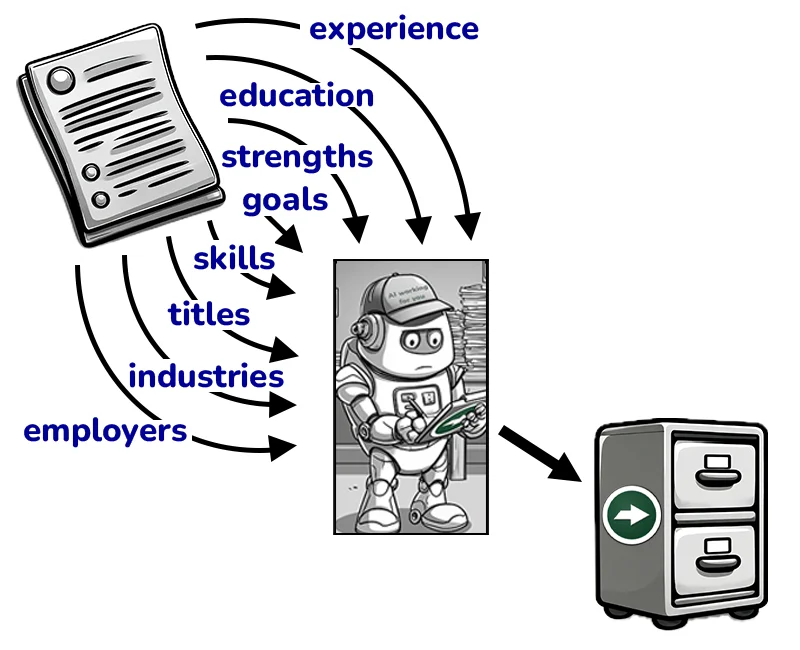
Built from your resume and everything your AI knows about you. The details of your professional life are structured, encrypted and saved.
The pieces of your Career Profile are then used as required by other Develop21 tools. For example, your target industries, company watchlist and career goals are loaded when planning a job search.
What is my Career Profile?
Your career profile is the structured record that Develop21 stores. It contains your past experience, present situation and future goals.
It is created by your AI from your resume and from chats you have with your assistant. Develop21 provides the structure for your AI to use to extract and store your data.
What do you store and how can I see it?
Click the Dashboard button to 'Edit Career Profile' to see the current values
How do I edit my profile?
Click the Dashboard button to 'Edit Career Profile', or ask your AI assistant in a new chat.
How do I download my profile?
Click the Dashboard button to 'Download Everything'.
How do I delete my profile?
Your career profile is critical context. Keeping it in a structured way allows your assistant to pull the pieces it needs at each stage in the process.
What is my Master Resume?
Develop21 keeps your Master Resume, which starts as your original upload.
When you create your profile, you will be walked through the AI detection process so that we know the starting point.
You may already have AI-written sections of your resume. We will help you edit these out so that your applications are clean.
How does it get updated?
Your Master Resume evolves as you edit and update it with your AI.
Your assistant can suggest things and ways of explaining, but the words have to be yours or they will be flagged later.
You type your updates into the chat. Your words are then added to your resume. Your assistant can fix typos and move sections around but the paragraphs must be yours.
New material is added to your Experience Highlights first. That can be pulled into subsequent tailored resumes, and may eventually become part of the Master Resume.
By keeping a master resume alongside a pool of experience like this, you can keep all your stories, not just the ones in the master file.
When you complete a round of updates to your Master Resume, you again run the AI detection process. Your paragraphs are then certified and added to your library.
How is it used?
The Master Resume forms the basis for every tailored resume you produce.
The tailoring process also has a deeper pool of stories to draw from in the experience highlights field.
Any time you need to download this, your AI will turn the latest version of your Master Resume into an ATS-friendly Word or PDF document.
Plan My Job Search
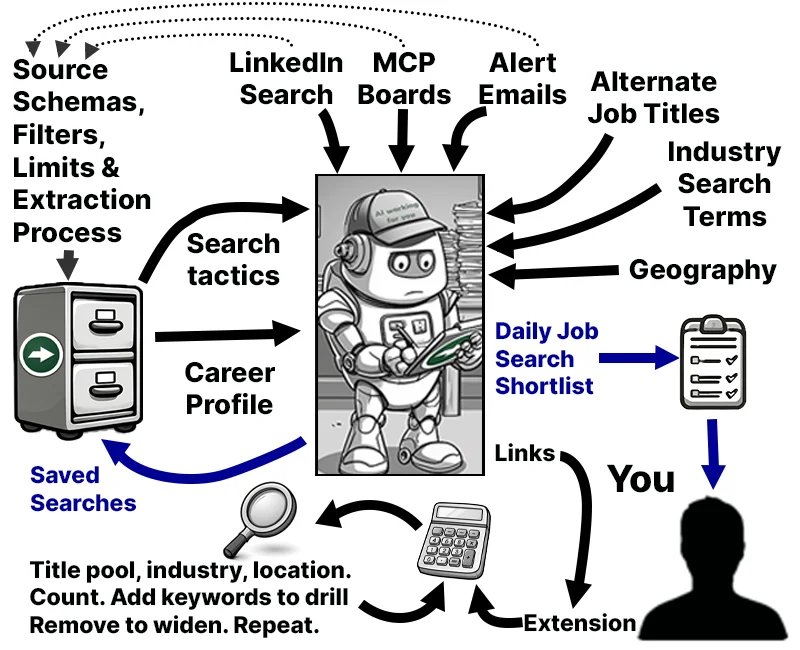
Develop21 tools provide your AI with detailed advice on where to search for jobs. The tools help your AI know which career profile fields go in which filter on each job board.
Your AI can build your searches on multiple platforms and consolidate the results for you.
When you run the searches, your AI is able to turn a long-list of results into a short-list of possibilities.
How do I build a healthy pipeline?
A job search is more than a few simple queries.
You actually want complicated queries that use AND, OR and NOT, with and without quotes, and with brackets in the right place.
A healthy pipeline includes queries that can find all the titles you are capable of holding, in industries you know, close enough to where you live (or remote).
Your triage then needs to reduce your long-list into a short-list to review.
You can only properly apply to two or three a day - so choosing the right ones is critical.
What does a healthy pipeline look like?
If you want quality jobs to review, you need to have a steady flow of opportunities. It helps to think about what that pipeline looks like.
How do I plan my job searches?
Once you have a Career Profile, the natural next step is to 'Plan Job Search', so click that button on the Dashboard or ask your assistant
How are searches built?
AI can build complex queries that are more likely to find the best roles for you. Humans have designed these steps, but AI can perform them much quicker than any human
How do I get my short-list?
Execute Job Search runs all the saved queries and triages the results, delivering you a short-list of the best opportunities.
How are searches run?
AI executes all your saved searches, combining and short-listing the results of all the searches for you
Your AI builds the long-list from all the search results, and then helps you triage that list so that your short-list is manageable.
How are searches improved?
Over time, it will become apparent that some searches are more productive than others.
You can search for jobs without help from your AI, but it is easier with help.
AI can help you write broader searches that are also more specific to you. So while your reach is increased, the results are more likely to include roles where you would be a top applicant.
Job Opportunities
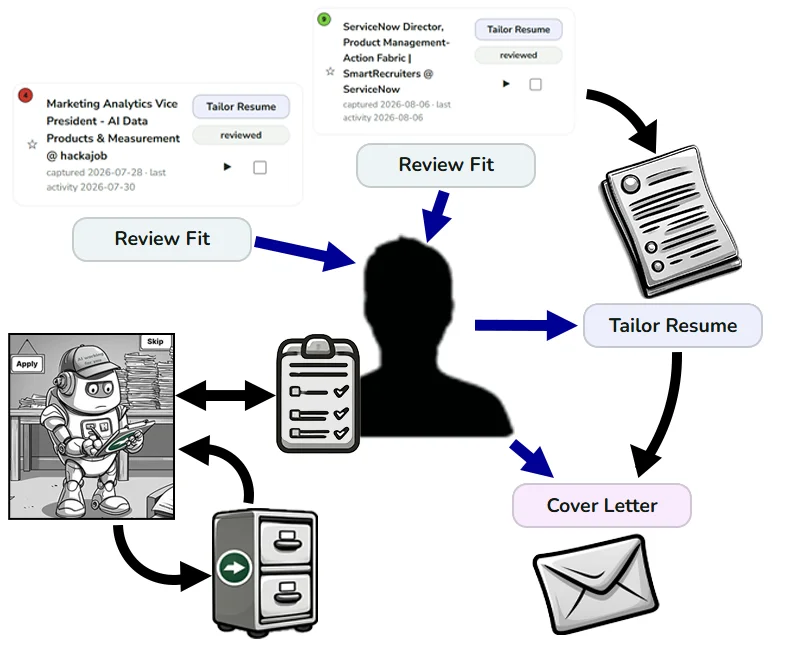
There are four parts to each opportunity - the original job description, the job fit review, your tailored resume and your cover letter.
When one stage is complete, you can trigger the next on the Dashboard. You can also update statuses and delete opportunities that are no longer being pursued.
How are Job Opportunities created?
Jobs become opportunities when you capture the description.
There is a clear process once a description is captured. First is a fit review, where your assistant helps you understand the role description and gives you an honest assessment.
How are Job Opportunities captured?
When you capture a job description, a Job Opportunity is created and it uses one of your storage slots
What is an opportunity document pack?
There are up to four documents attached to each opportunity. When you paste or capture the full description, we create the Job Opportunity and it uses one of your storage slots
How are Job Opportunities reviewed?
After you have captured the job description, the next step is to do a job fit review. This will check both ways - do you fit them, and honestly, do they fit you? If it's going to be a waste of time, best to know now. You can ask your AI, or click that button on the Dashboard
The job fit review produces an analysis and a fit score between 1 and 10. The scores help you understand quickly which opportunities your AI believes are best.
Killing an opportunity after fully reviewing it is easier in an automated system. Most of the time you save with AI automation is getting to this point.
The time you save using AI is here.
How do you help my application?
If you decide to proceed, you have to write the application documents. You tailor your resume with your AI's help, and then your assistant helps you find the right stories to tell in your cover letter.
We do not apply for you. While auto-apply sounds superficially attractive, Develop21 believes this is the wrong use of AI capabilities. AI working for you does not include AI pretending to be you.
What do you mean by resume tailoring?
ATS filters work by matching the text from the job description to the text in your resume so if the two documents say the same thing, the filters classify you as a match.
How do you help me with the cover letter?
The cover letter is a complex dance. At the same time as echoing the description, it also has to uniquely describe and sell you. Deciding what to write and what not to write is challenging and time consuming. AI can help.
Why can't AI write for me?
The game is changing.
AI-written applications are much faster to produce and help candidates express themselves. But that has started to overwhelm recruiters. Their response is to tighten ATS filters, which is logical given the increased volume and keyword density they now face.
The systems, overwhelmed by new AI-written applications, can now detect and filter AI-written text. We expect them to start aggressively doing so.
So instead of helping you quickly create applications that will get filtered, we need to carefully help you write applications that will pass inspection.
Develop21 is still able to help:
The last part is important. We save your certified text for reuse.
When a document is certified, each paragraph that is certified AI-free is saved in your Develop21 account.
Why won't you auto-apply?
Some AI job search tools will carry out the whole process without any input from you. You can find videos online where people show how you can apply to 'hundreds of jobs an hour'.
Develop21 tools are not for that purpose. Why not?
There is still a lot that AI can do, even if it leaves the writing to you.
It can still plan your job search, execute the searches, filter results and track applications - mundane work that you otherwise have to slog through.
What happens after I apply?
Creating a complete application still takes time, even with help from your AI assistant. This is why many candidates feel resentment when their applications are ignored.
After you apply, all you can do is wait... and move on to the next opportunity!
What can I do while I wait to hear back?
Develop21 cannot prevent you getting ghosted!
If you do get invited to an interview, your AI can help you prepare. It can help you work through the questions you might be asked and what the best answers are that show your relevant experience and skills.
While you wait for this one, the pipeline is flowing. You can move forward with the next opportunity.
How can I track everything?
Multiple searches, every job description and fit review, tailored resume and cover letter...
It produces a lot of different versions of your sales pitch. Many ways to describe the same you.
Develop21 helps you stay on top of your messaging and play the ATS game at a high level.
What info do I need to manage?
Profiles need updating, searches need reviewing and tweaking, the growing number of opportunities need pruning and prioritizing.
Where can I see everything?
Develop21 helps you keep your documents organized.
How can I clean up what I don't need?
Tailoring everything to each opportunity - speaking their language in each application - helps get you through ATS filters, but it creates complexity and a lot of documents for you to manage.
Getting a job is hard work. With Develop21 tools, your AI assistant can help you plough through and find the role you deserve.
Get Develop21 tools for your AI assistant and ask them to "find the best three for me".
Why I built Develop21

Hello, I’m Jeremy Penston. I built Develop21 to make AI work for you.
When my last contract ended, I tried to use AI to help me find my next role - just like you might be doing now.
AI's forgetfulness was a real problem. Every new thread was a void, as if the last conversation never existed. “Friendly, helpful AI” persisted, telling me what I wanted to hear and polishing every idea until it shone.
But when it helped me search, it quickly got stuck: it had no concept of widening the job title pool, so it was searching for the same job I had been doing for the last 11 years. I wanted something new.
My résumé is a mix, so to an Applicant Tracking System (ATS), I’m an 8-out-of-10 for every job and a perfect fit for none. I don’t even meet the written requirements of the job I just left.
An ATS filter does basic string matching - keywords and sub-strings. It picks the keywords from the job description and then searches for them in each applicant resume.
It has led to a game, where the winning move is to re-write your resume each time, using the language of that job.
I wrote about this broken system at the end of 2014 - it is still broken in 2026, so I built a system to play the game the right way.
If the game is to use the job description language when describing yourself, the right way to play it is to have a large pool of stories to pick and choose from. Then when a job requires certain things, you can include those stories in your application.
This was not possible before. Ten jobs, ten different resumes with hours spent on each? No - the generic resume had to be enough. Now, AI automation makes it possible to write and keep a different version for each application.
The forgetfulness, the cheerleading, and all the other ways I was wasting my time were because of the same reason. The assistant didn't have my full story even though we were writing documents about it all day. So I created Develop21 to give AI the tools it needs to answer properly.
I’ve learned the value of honesty through coaching. Bring a job in from anywhere on the web and your AI gives you a straight assessment. Is it worth your time? And if it is, what do you need to develop to win it? Everyone’s afraid AI will take their job - so I built the tools your AI needs to help you get one.
I will never sell your data, and you’ll never see an advert anywhere near Develop21. The law requires disclosure in exceptional circumstances - but unless you’re using this to do harm, your data is as safe as I know how to make it.
- Jeremy Penston, Founder
A career is a series of moves. Make good ones.
Develop21 is live - add it to your AI assistant in minutes. Use it for free to track up to ten Job Opportunities at a time; Develop21 Storage removes the limits for $4.95 a month, and the first 1,000 subscribers get a lifetime 40% off voucher. Terms apply.